To force refresh a page on your desktop computer,
Do a SHIFT + Reload
Hold down the SHIFT key and click the Reload button in your browser at the same time.
When changes are made to a web page, often web developers will have to update the same files on the server. If you've been to that web page in the last day or so, your web browser may be set up to cache (save) images locally on your computer to help speed up browsing. If this occurs, then you may not be seeing the changes that were made to a web page since you do not have the updated files. What you need to do is force your web browser to refresh the page.
This is simple to do and a good, handy tip if you ever run into a problem on a website you visit often.
To do a "force refresh" you should hold down the SHIFT key on your keyboard while clicking the Refresh button in your browser (at the same time). This forces your browser to delete anything that's cached and get new versions of all the files from the server, which includes things like images and CSS files.
You will then grab the latest files from the server and things that you thought were not working on your website may now work. Please check this before you contact us about things not working.
To do this on an iPad or iPhone, you'll need to:
You'll be asked if you want to clear everything - so, just be warned... this will clear everything... your browser history (not bookmarks), cache and cookies.
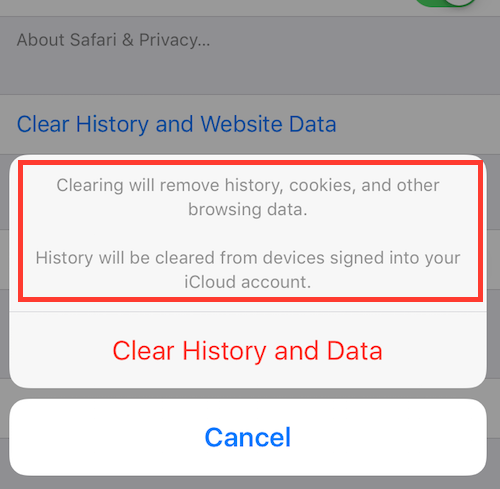
Do that and then return to Safari and reload the page (if necessary).

This happens because we may have changed some of the files that you have cached on your computer. This includes CSS files and other important files that your web browser might skip loading in order to save load time. Again, you've been visiting your website a lot, so your computer probably has saved these files. People that are coming to your website for the first time or people who haven't been there for a little while will be grabbing the latest files and they should be seeing things correctly.
If after doing this, you still see issues, then please contact us and even do a screen shot showing us what the issue is.
No, you shouldn't have to. This is happening because you're visiting your website a lot - more than most people. Someone who hasn't ever been to your website will not have this problem. Someone who has not been to your website in the last few days will also not have this problem.